THE OFFER
Four situations where seconds matter.
Every alert is configured zone by zone to match how your service actually runs, with a grace period so ordinary moments don't raise an alarm.
THE OFFER
Four situations where seconds matter.
We’ve identified four scenarios that lead to a high-risk environment and built our platform to alert you to them. Each alert is configured zone by zone to match how your centre actually runs, with a configurable grace period so ordinary moments do not raise an alarm.
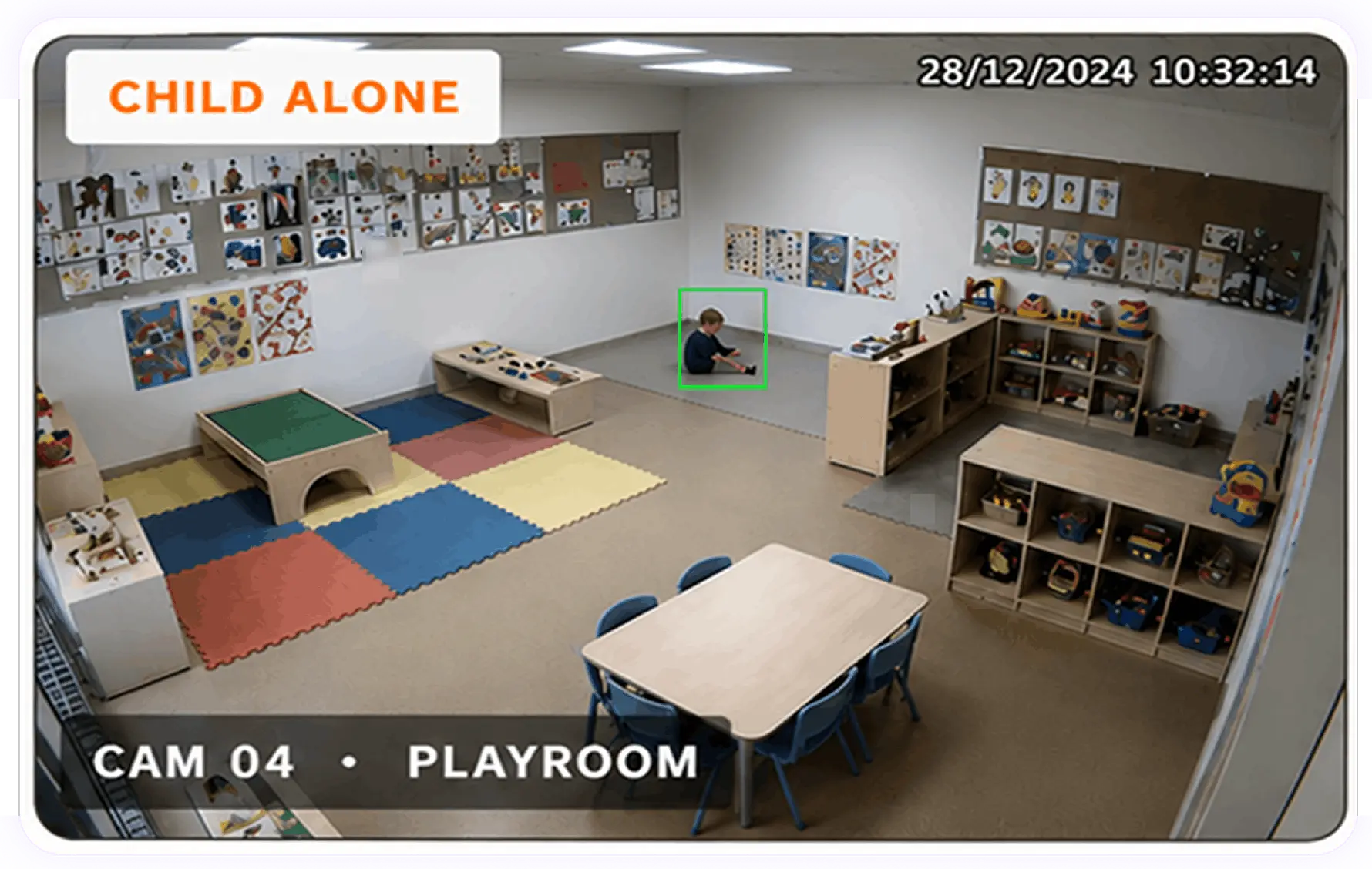
1. Child unattended
Scenario: A child is in a monitored zone with no adult present.
Why it matters:
An unsupervised child alert fires within the first few seconds, so an educator can respond before the situation escalates.
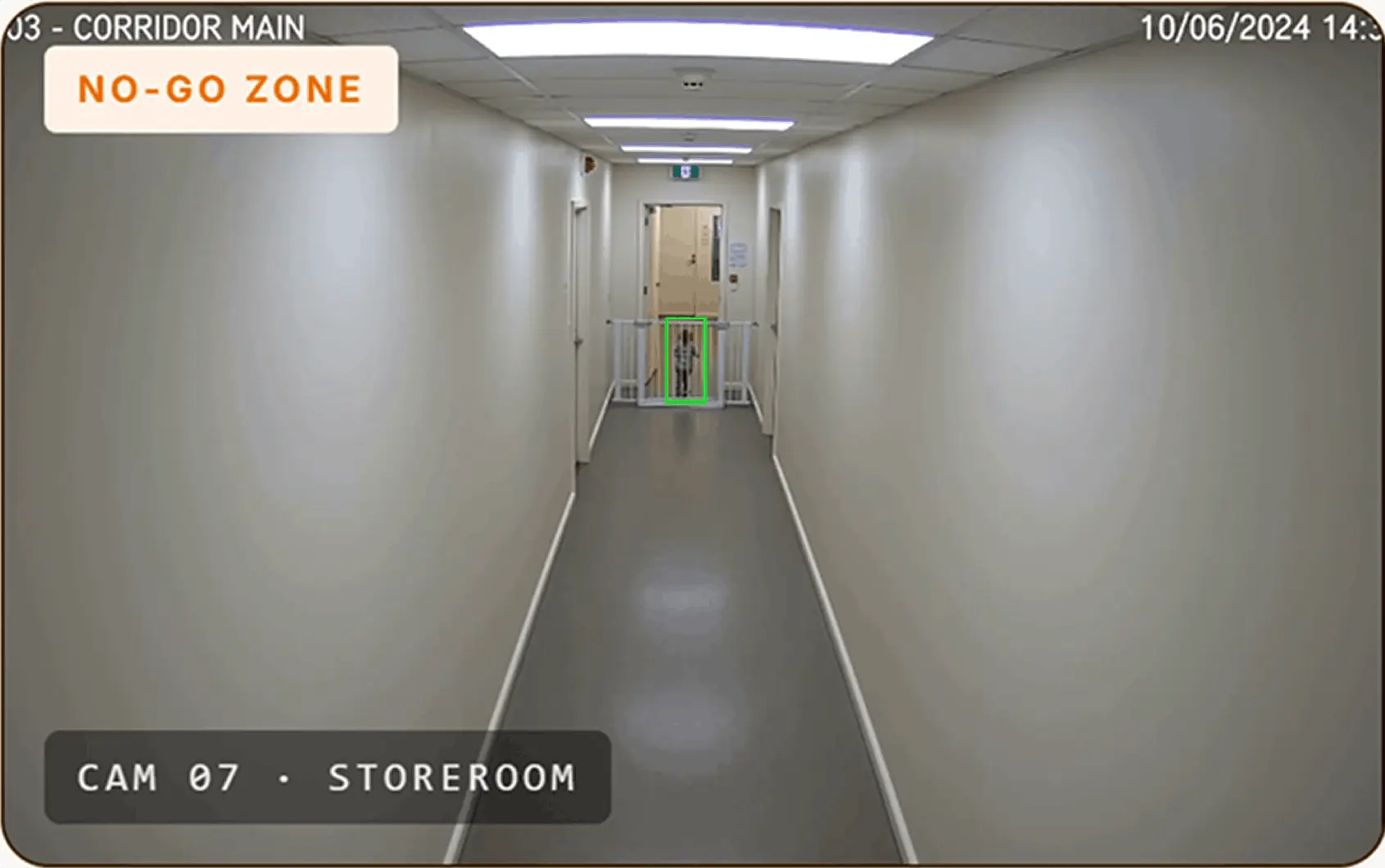
2. Child in a restricted area
Scenario: A child enters a restricted area.
Why it matters: You define those zones once and they are watched continuously, including at the moments when everyone is occupied with something else.
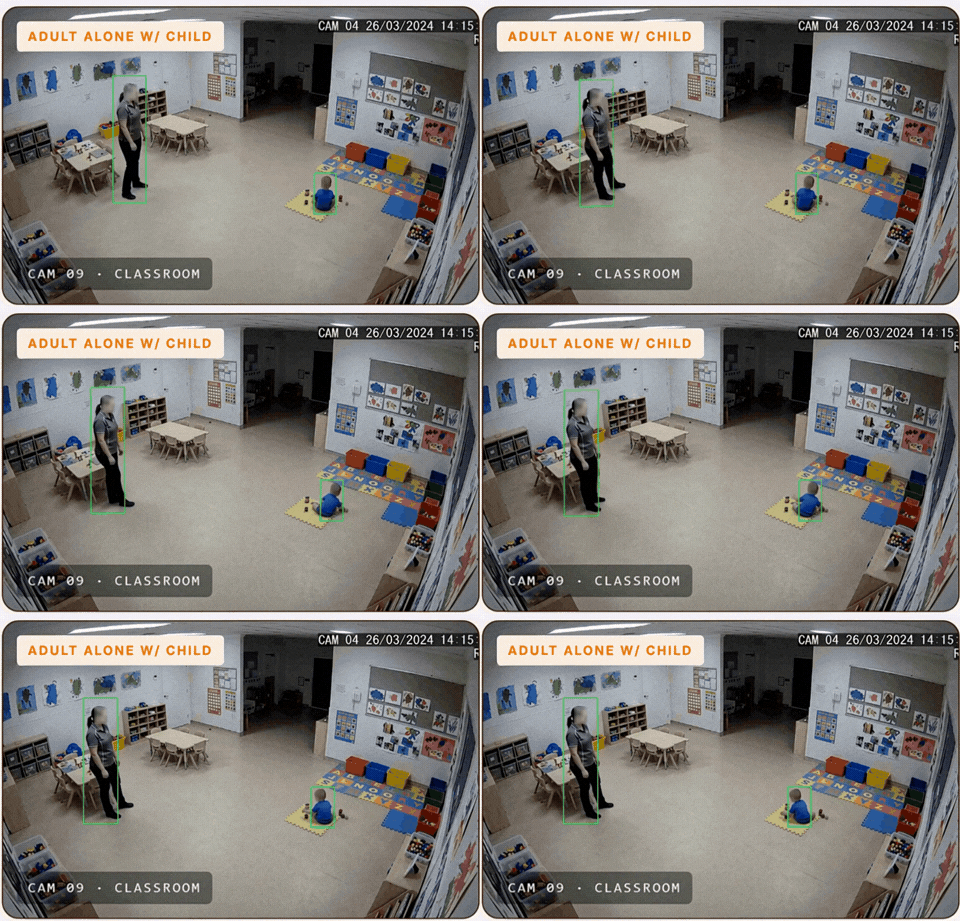
3. Adult alone with a child
Scenario: A single adult is detected alone with one or more children.
Why it matters: Knowing in the moment lets you correct it before it becomes an issue, and it protects educators as much as children.
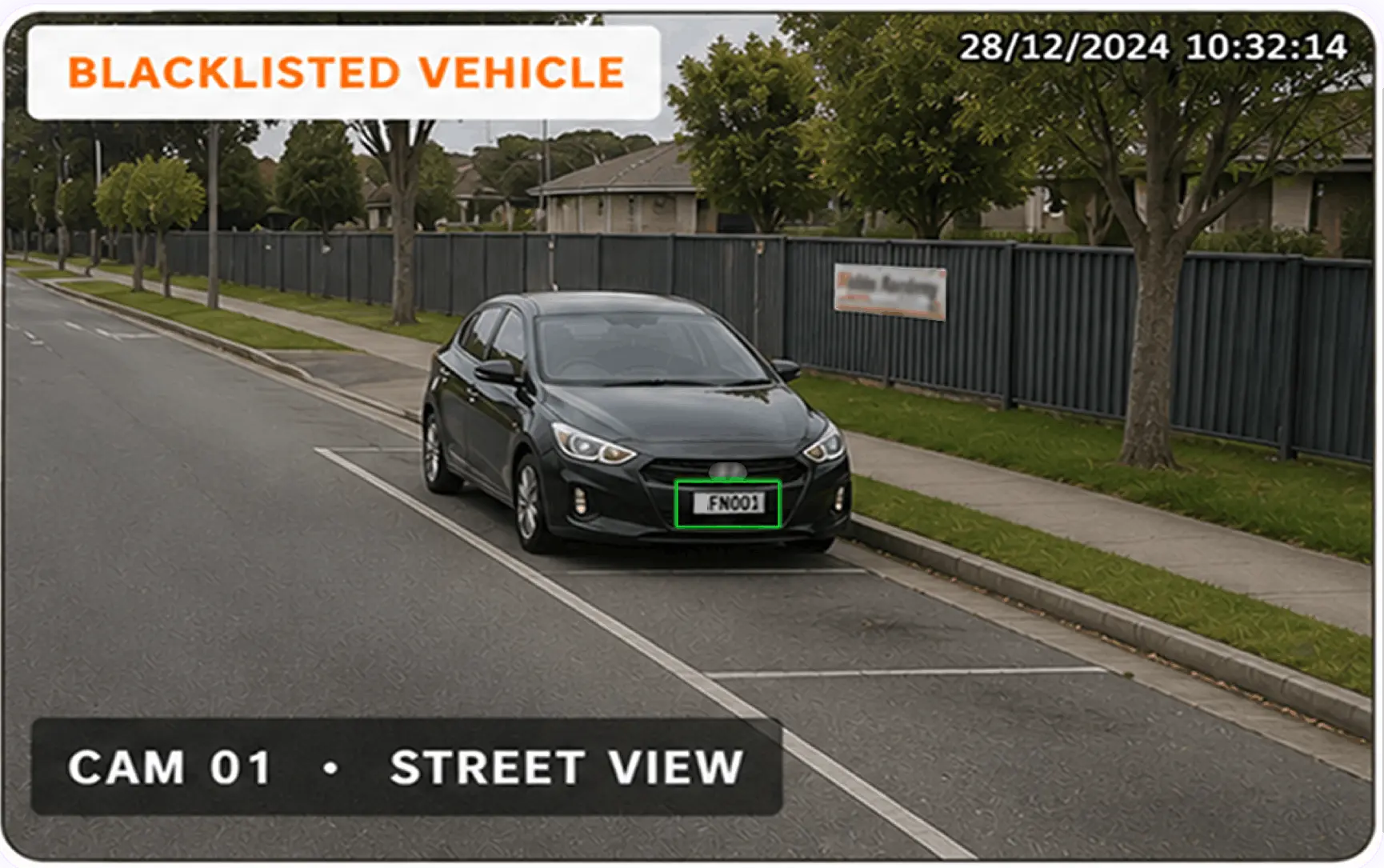
4. Flagged vehicle in the car park
Scenario: A vehicle on your watchlist arrives on site.
Why it matters: The car park is the one place where you can get a warning before someone reaches the door.

From alert to resolution
Every alert follows a clear path from detection to resolution, with every outcome available to export.
1
Detect
Alert is created with service, camera, time, and reference number.
2
Your team is notified
Lands in one queue: New, Pending, Resolved.
3
Reviewed in context
Clip, site details, contacts and your procedure on one screen.
4
Actioned & Written up
Recorded while the details are still fresh.
5
It becomes a record.
Date, alert type, zone, who actioned it, outcome. PDF or CSV.
Inside the SafeDay platform.
See which centres need attention and what’s happening right now. Teams managing multiple centres can review, respond and follow up from one place.
 SafeDay Demo Centre
SafeDay Demo Centre
SafeDay Demo Centre
Multi-site status at a glance.
Centres shown as green, yellow or red, based on trends of alerts.
A real-time map of every site.
Each centre plotted and colour coded by status, Click a marker for detail.
Overdue and genuine alert tracking.
Alerts still waiting on action, and the share of alerts that turned out to be genuine.
Alert trend over time.
Total alerts across all centres over 14, 30 or 90 days.
Smart alerts as they arrive.
The current queue, newest first, with centre, time and alert type.
Plate matching on arrival
Vehicles are logged as they arrive and matched against your approved guardian and staff registry. If a flagged plate arrives, your team is told before the driver reaches the gate.
Know the moment a camera goes down
A camera that has quietly failed is a safety problem, not an IT problem. Cameras, servers, switches and UPS are monitored from a single dashboard, so issues are caught before they affect a site.
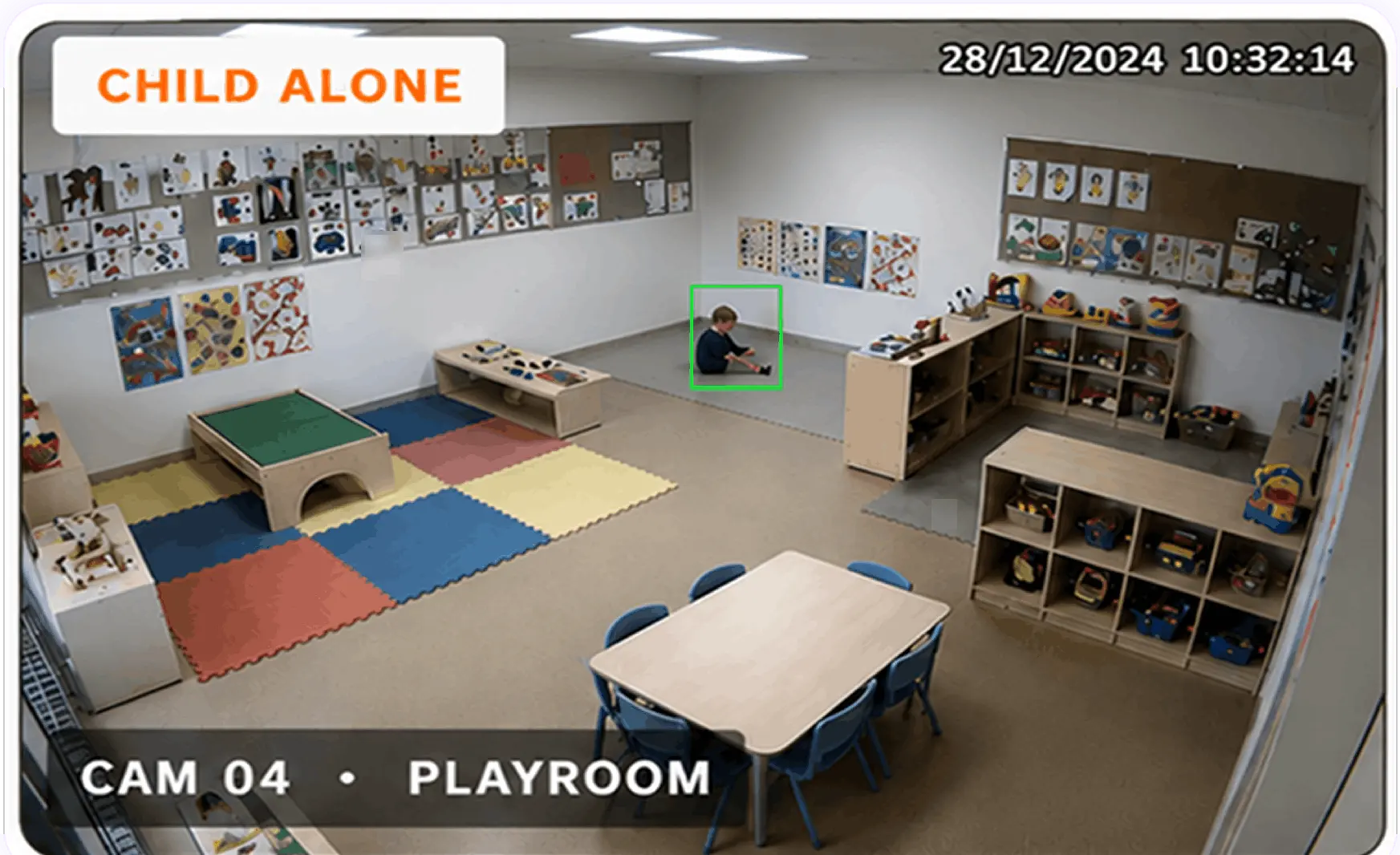
1.Child unattended
Scenario: A child is in a monitored zone with no adult present.
Why it matters:
An unsupervised child alert fires within the first few seconds, so an educator can respond before the situation escalates.
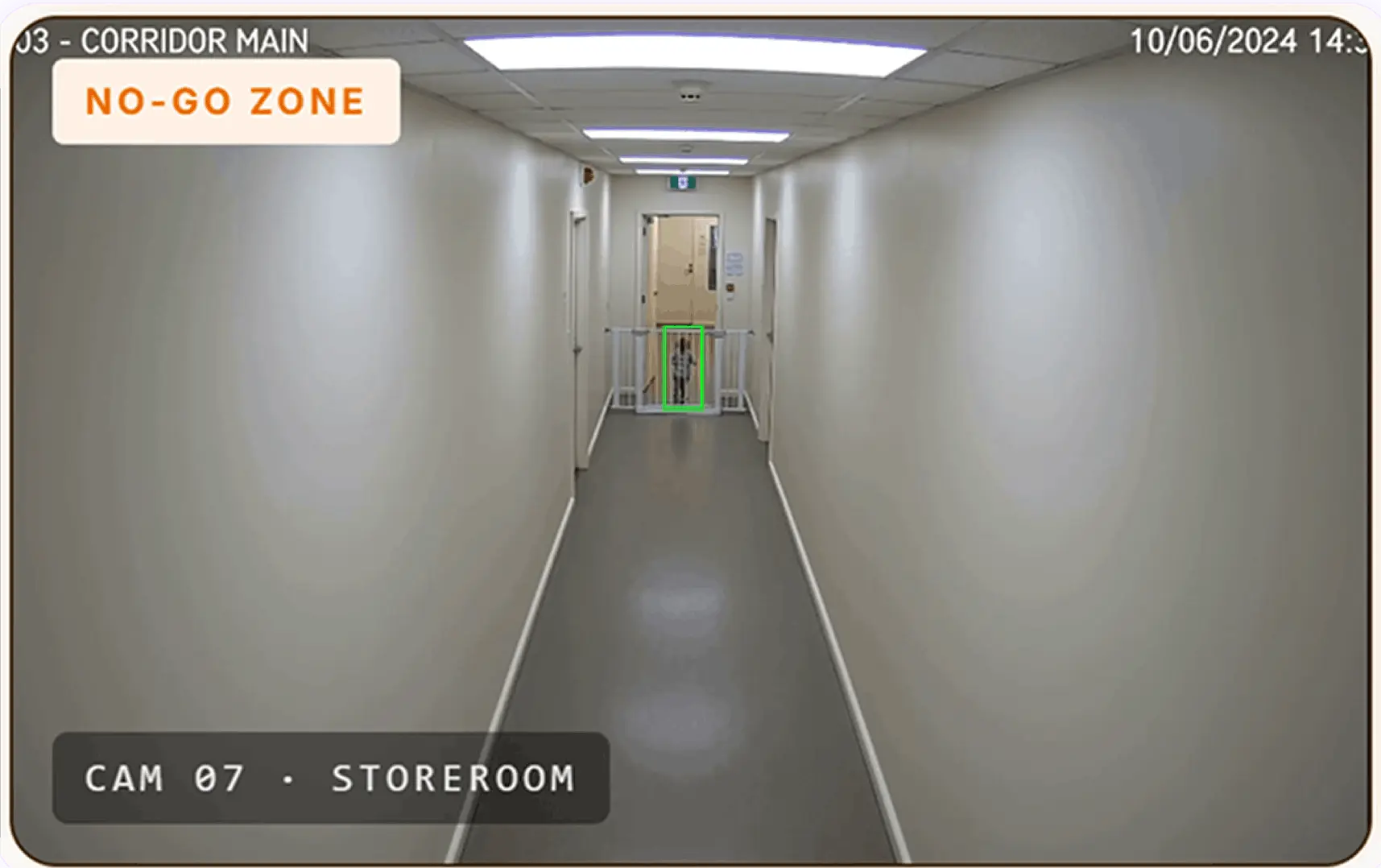
2. Child in a restricted area
Scenario: A child enters a restricted area.
Why it matters: You define those zones once and they are watched continuously, including at the moments when everyone is occupied with something else.
3. Adult alone with a child
Scenario: A single adult is detected alone with one or more children.
Why it matters: Knowing in the moment lets you correct it before it becomes an issue, and it protects educators as much as children.
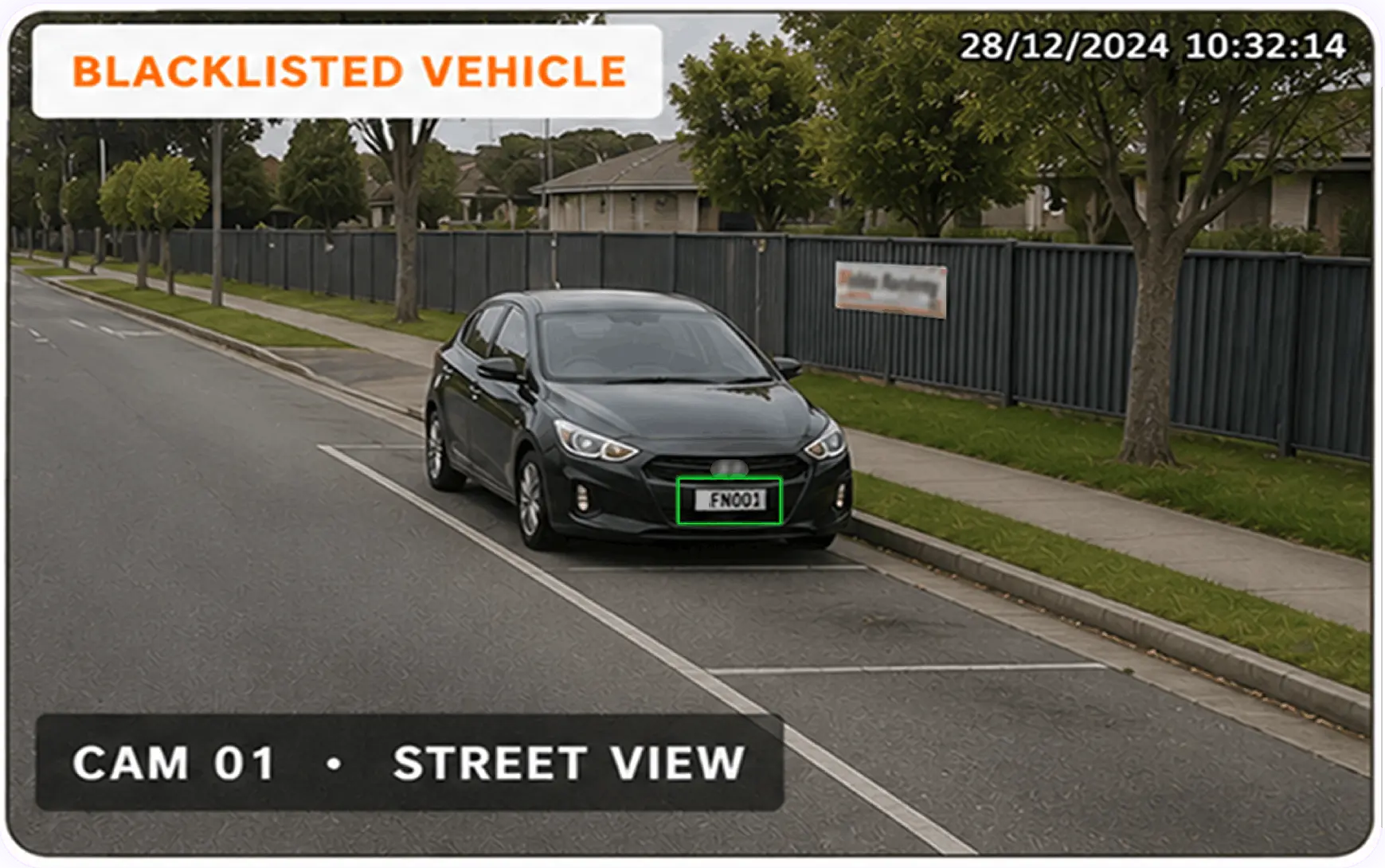
4. Flagged vehicle in the car park
Scenario: A vehicle on your watchlist arrives on site.
Why it matters: The car park is the one place where you can get a warning before someone reaches the door.
Inside the SafeDay platform.
See which centres need attention and what’s happening right now.
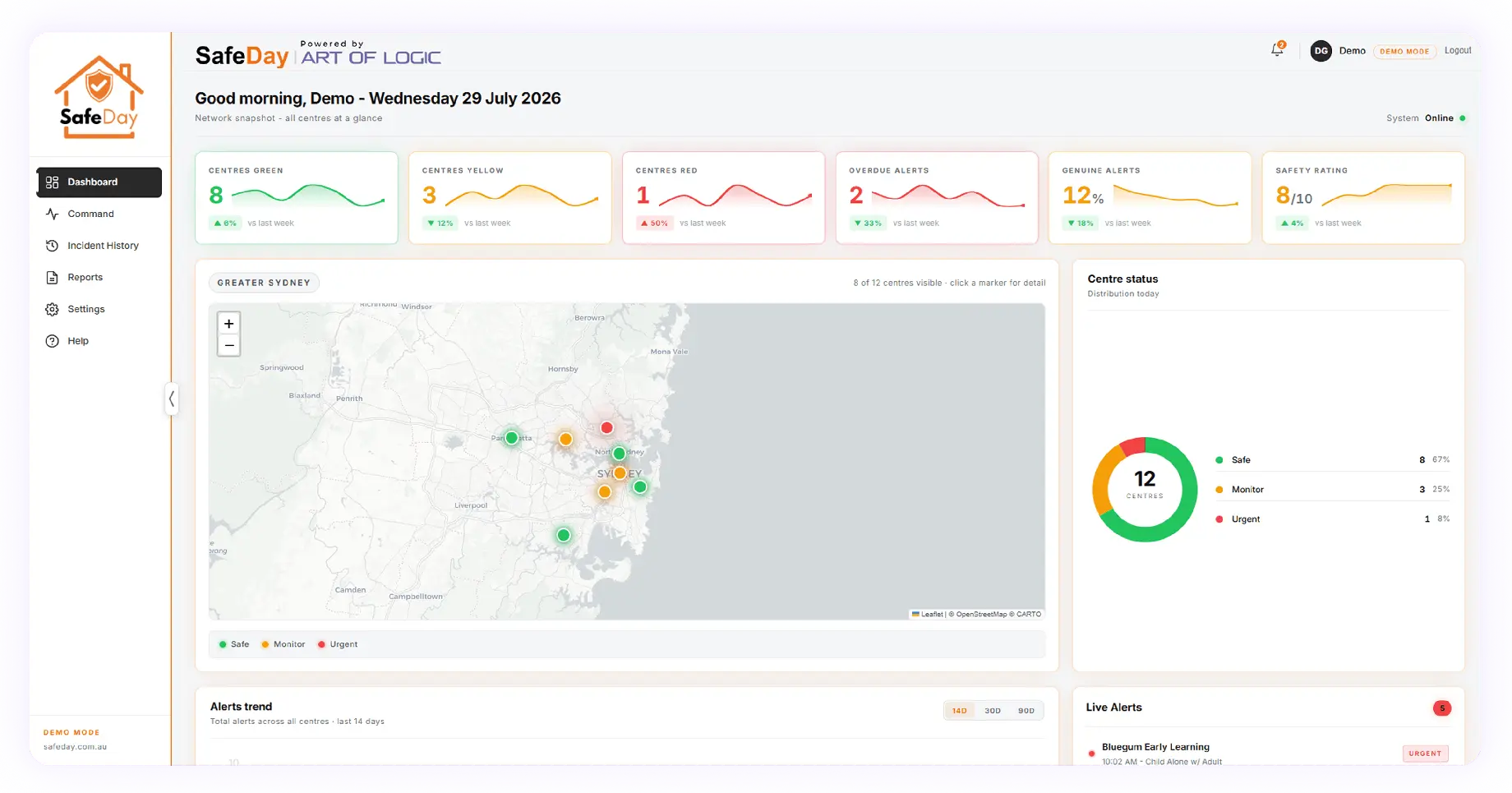
What is on the dashboard
- Multi-site status at a glance. Centres shown as green, yellow or red, based on trends of alerts.
- A real-time map of every site. Each centre plotted and colour coded by status, Click a marker for detail.
- Overdue and genuine alert tracking. Alerts still waiting on action, and the share of alerts that turned out to be genuine.
- Alert trend over time. Total alerts across all centres over 14, 30 or 90 days.
- Smart alerts as they arrive. The current queue, newest first, with centre, time and alert type.
Why Childcare Providers Choose Us
Why Childcare Providers Choose Us
Built for the people who protect children.
Four alerts chosen for childcare: child unattended, child in a restricted area, adult alone with a child, and a blacklisted vehicle in the car park. They run on your existing cameras, arrive in one app with the centre's own contacts and procedures attached, and every alert is reviewed by a person. Australian built, Australian hosted, no facial recognition.

Art of Logic and SafeDay, integrating the Samurai Suite.
Three parts, and only one of them is something your team ever opens.
Secure. Compliant. Audit ready.
- 7-year audit trail for alerts, actions and viewers
- AWS Sydney only — no offshore data
- Built for the 2025–26 NQF child safety changes
- Breach response aligned to the Notifiable Data Breaches scheme
- Annual penetration testing by an Australian security firm
Technology partners






Technology partners
Childcare CCTV compliance under Australian law
The 2025–26 childcare safety reforms in Australia tightened notification timeframes and introduced new child safe standards for digital technology and CCTV. SafeDay is built so the record you need already exists when the clock starts.
Regulation 176
Ready inside the window
Clip, event timeline and incident record export together to PDF or CSV, with the zone, who actioned it and the outcome.
Privacy ACT 1988
Aligned to the Privacy Act
Built to support compliance with the Privacy Act and the Australian Privacy Principles.
NQS Quality Area 2
Evidence for assessment
A dated, exportable record of how supervision situations were identified and actioned.
Security
Tested every year
Penetration tested annually by an Australian security firm. Role-based access with multi-factor authentication.
Regulation 168
Your digital technology policy
An auditable record of how footage is accessed, used, retained and destroyed, supporting the policy your service writes.
Data residency
Held in Australia
AWS Sydney only, with no offshore data. Notifiable Data Breaches scheme operational from day one.

Frequently asked questions
If your questions aren’t covered here, request a demo and we’ll walk you through it.
It depends on how many services and cameras you run, and how many zones you want covered, so we scope it per service rather than publishing a list price. Our sales team will work it through with you on the first call.
In most services, no. SafeDay runs on standard CCTV architecture — no specialist cameras, and no separate platform to log into. It starts with a site review of your existing cameras and coverage, so you know where you stand before committing to anything
No. There is no facial recognition and no biometric identification. Each detected person is assigned an anonymous ID built from appearance alone — clothing, shape and colour. No face is captured and no biometric profile is stored.
That ID follows the same person from camera to camera, so an alert reflects what is happening across your service rather than what one camera happened to see.
Every alert is reviewed by a person before anything is escalated, then handled using the contacts, call order and procedures your service sets. Access is role-based, with multi-factor authentication, and limited to the people your service authorises.
AWS Sydney only. No offshore data, no exceptions. The platform operates under the Notifiable Data Breaches scheme from day one, is penetration tested annually by an Australian security firm, and is built to support compliance with the Privacy Act 1988 and the Australian Privacy Principles.
Rollout includes training for your team, and it is worth having the conversation before go-live rather than at it.
The alert for an adult alone with a child protects educators as much as children. Every alert ends as a dated record showing the zone, who actioned it and the outcome, with the clip attached — so when a question is raised about what happened in a room, there is evidence rather than one person’s word.
Since 1 September 2025, Regulation 168 requires your service to have a policy and procedure covering how images and videos of children are taken, used, stored and destroyed, including the use of CCTV.
The two points worth stating plainly in it are that no face is captured and no biometric profile is stored, and that footage is held in Australia only.
Zones are configured to your service, and camera placement is agreed during the site review. The areas that benefit most are the ones outside the room: the front gate, the car park, corridors and the kitchen.
Retention is a decision for your service and belongs in your Regulation 168 policy, which has to cover how footage is destroyed as well as how it is stored. It is one of the things to settle during the site review, so the period in your policy and the period you actually run are the same number.
Every alert is configured zone by zone, with a configurable grace period so ordinary moments do not raise an alarm. These are tuned during the pilot, because a queue your team learns to ignore is worse than no queue at all.
Yes, and we recommend it. The path is a site review, then zones and alerts configured to your centre, then a pilot at one site, then rollout across your group with training for your team. You can stop after any of those steps.
The detection engine isn’t new. The childcare configuration is.
Art of Logic’s analytics has been running across law enforcement, retail, councils and critical infrastructure for years. What is new is what we built on top of it for early learning.

Understand movement over time
Re-ID follows the same person from one camera to the next using shape, size and colour, so an alert reflects what is happening across your whole centre rather than what one camera can see.
See the four alerts running on a live site
We’ll review your camera coverage and show you what fires in a real centre.
See the four alerts running on a live site
We’ll review your camera coverage and show you what fires in a real centre.